The AI Assistant in Manuscripts.ai is designed to be a flexible and powerful partner, but its true potential is unlocked when you tailor its behavior to your specific needs, style, and project requirements. The AI Settings panel is your command center for this customization, allowing you to control everything from the AI’s core “brain” to its linguistic nuances and helpful automations.
This guide provides a comprehensive overview of the AI Settings, explaining what each option does and how you can configure them to create a truly personalized writing experience.
Accessing AI Settings
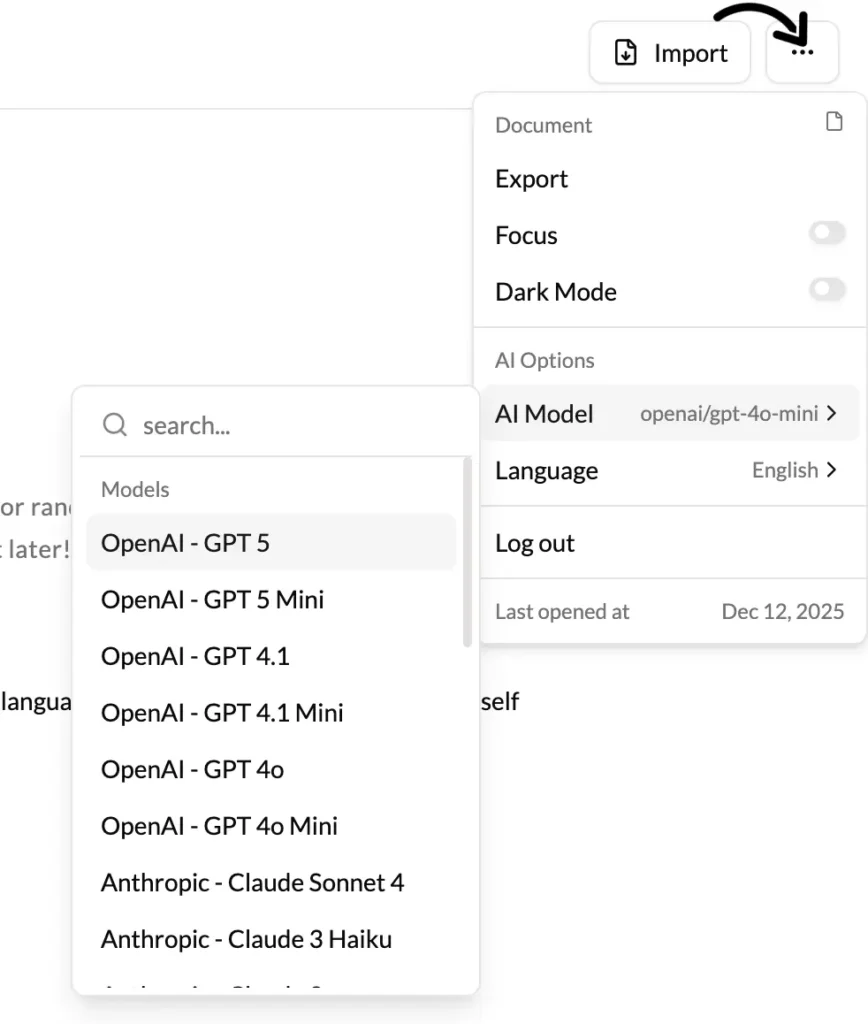
You can typically find the AI Settings on a per-project basis, often represented by a gear or slider icon within your project’s main view. This is because the ideal settings for a gritty sci-fi novel will be very different from those for a formal academic paper. Some global settings may also be available in your main account profile.
AI Models & Tokens: The Engine of Your Assistant
This is perhaps the most crucial section, as it determines the fundamental nature of the AI’s responses.
Understanding AI Models
Think of an AI Model as a specific “brain” or personality for your AI Assistant. Each model has been trained differently and possesses unique strengths. Choosing the right model for your task is key to getting the best results. While our platform may update and add models over time, they generally fall into categories like these:
GPT Models (OpenAI)
- GPT-3.5 Turbo: The best model for drafting blog posts, brainstorming ideas, and generating creative content quickly. Ideal for writers who need a versatile tool for general writing tasks.
- GPT-3.5 (Instruct): Best for writers who need step-by-step clarity, structured articles, and detailed instructional content. Great for how-to guides and technical explanations.
- GPT-4o Mini: A fast model for generating summaries, crafting dialogue, and writing short stories with ease. Perfect for quick, engaging content.
- GPT-4o Latest: The most advanced OpenAI model, offering deep storytelling capabilities, refined prose, and enhanced research assistance. Ideal for novelists, journalists, and technical writers.
Claude Models (Anthropic)
- Claude 2.1: A structured and thoughtful model, excellent for long-form content, essays, and business writing. Writers looking for polished, well-organized text will find this model particularly useful.
- Claude 3 Haiku: A fast and efficient option for refining drafts, summarizing information, and making quick edits. Great for tightening prose and improving readability.
Gemini Models (Google)
- Gemini Pro: A powerful tool for research-driven writing, investigative journalism, and SEO-optimized content. Ideal for writers who rely on data and factual accuracy.
- Gemini Flash 1.5 8B: A fast, lightweight model suited for quick content creation, engaging social media posts, and short-form marketing copy.
Meta Models (Llama)
- Meta Llama 3.2 3B Instruct: A compact and efficient model, great for writers crafting concise guides, microfiction, or engaging chatbot-style storytelling.
DeepSeek Models
- DeepSeek V3: Best for expanding ideas, generating detailed Q&A content, and helping writers develop compelling conversations and dialogues.
- DeepSeek R1 70B: A robust model tailored for in-depth research, long-form articles, and structured nonfiction writing.
Other AI Models
- Goliath 120B: A powerhouse for fiction writers, world-building, and immersive storytelling. Ideal for authors developing rich, detailed narratives.
- Weaver Alpha: A model for academic writing and knowledge synthesis. Writers focused on precision and structure will benefit most. Also best for NSFW and uncensored content writing suited for adult content and fantasy.
Mistral Models
- Mistral Mixtral 8x7B: A balanced model for marketing copy, creative nonfiction, and compelling storytelling with a natural tone.
- Mistral Nemo: Perfect for news articles, in-depth reports, and professional research writing.
- Mistral Large 2: A premium choice for novelists, screenwriters, and deep world-building, capable of producing intricate and engaging narratives.
Understanding Tokens
To understand how the AI processes language, you need to understand tokens.
- What is a Token? A token is a piece of a word. For English text, one token is roughly equivalent to 4 characters or about ¾ of a word. The phrase “Hello, how are you?” is broken down by the AI into tokens like [“Hello”, “,”, ” how”, ” are”, ” you”, “?”].
- Why Do Tokens Matter? AI models have a “context window,” which is the maximum number of tokens they can “remember” at one time. This includes your prompt, the preceding text, and the generated response. Furthermore, your subscription plan may have a monthly token usage limit. Using the AI—whether for generating text, editing, or using templates—consumes tokens.
In the AI Settings, you may find:
- Usage Meter: A visual indicator showing how many tokens you’ve used in the current billing cycle.
- Max Generation Length: A slider that lets you control the default length of AI generations. A shorter length consumes fewer tokens and is faster, while a longer length is better for drafting entire sections. Setting a reasonable default (e.g., 250 tokens) can help you manage your usage effectively.
Language: Speaking Your Language
This section allows you to configure the linguistic settings for your project.
- Primary Project Language: Select the main language you are writing in (e.g., English, Spanish, French, Japanese). This setting is critical as it tells the AI which language rules, grammar, and cultural nuances to prioritize. All AI-generated content, suggestions, and edits will be in this language.
- These are the supported Languages:
Afrikaans
Arabic
Armenian
Azerbaijani
Belarusian
Bosnian
Bulgarian
Catalan
Chinese
Croatian
Czech
Danish
Dutch
English
Estonian
Finnish
French
Galician
German
Greek
Hebrew
Hungarian
Icelandic
Indonesian
Italian
Japanese
Kazakh
Korean
Latvian
Lithuanian
Macedonian
Malay
Maori
Nepali
Norwegian
Persian
Polish
Portuguese
Romanian
Russian
Serbian
Slovak
Slovenian
Spanish
Swahili
Swedish
Tagalog
Thai
Turkish
Ukrainian
Urdu
Vietnamese
Welsh
- Translation Settings: Here, you can set a default target language for the “Translate” feature in the Selection Tool. If you frequently translate text to German, for example, setting it as your default here will save you a step each time.
Formality Level: For languages that have formal and informal modes of address (like “vous/tu” in French or honorifics in Japanese), this setting allows you to set a default. You can choose “Formal,” “Informal,” or “Auto-detect” to have the AI match the surrounding text’s tone.