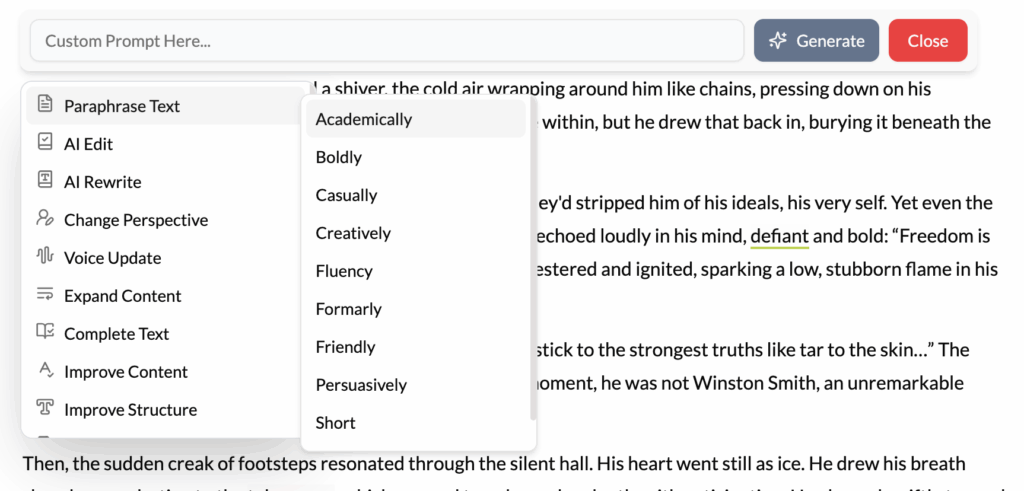
What It Does?
The Paraphrase tool intelligently rewrites the selected text, changing the vocabulary and sentence structure while meticulously preserving the original core meaning. Its primary goal is to offer alternative phrasings to improve clarity, flow, and sentence variety.
How to Use It?
- Highlight Text: Select the sentence or short paragraph you want to rephrase. This works best on a micro-level.
- Click Paraphrase: Select the “Paraphrase” option from the contextual menu.
- Choose the Best Option: The AI will instantly generate several alternative versions of your selected text. You can review these and choose the one that best fits your needs.
How It’s Different from AI Rewrite?
Think of Paraphrase as a linguistic tool and AI Rewrite as a creative one.
- Paraphrase says the exact same thing in a different way.
- AI Rewrite takes the core idea and says something new with it, potentially changing the tone, focus, or impact.
Best Use Cases
- Avoiding Repetition: You’ve used the same sentence structure or a particular word (like “important”) multiple times in a short space. Paraphrasing offers immediate alternatives to keep your prose fresh and engaging.
- Improving Clarity: If you’ve written a complex, jargon-filled sentence, the Paraphrase tool can often find a simpler, more direct way to express the same idea, making it more accessible to your reader.
- Academic and Research Writing: When integrating information from a source, it’s crucial to paraphrase in your own words to avoid plagiarism. This tool can provide a starting point, which you should then edit further to ensure it fully represents your own authorial voice. Remember to always cite the original source of the idea.
Pro-Tip
Use the Paraphrase tool to test the clarity of your own writing. If the AI struggles to paraphrase your sentence or produces options that miss your original meaning, it’s a strong indicator that your original sentence was too ambiguous or convoluted. This can be a valuable signal to simplify and clarify your thoughts.