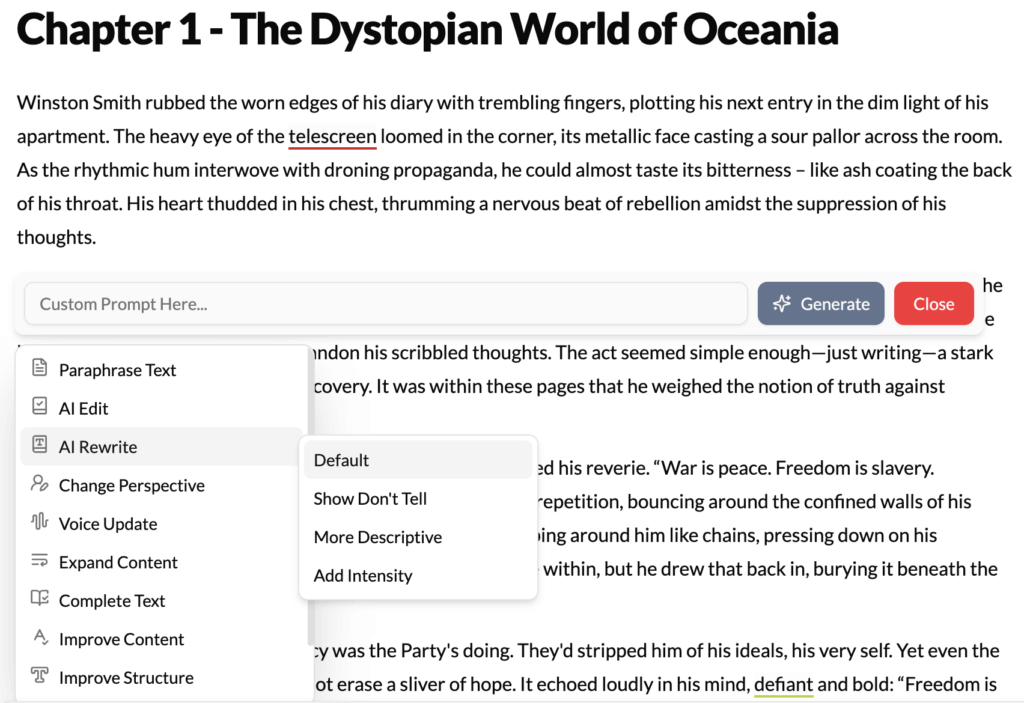
What It Does?
The AI Rewrite tool is a powerful creative partner that goes far beyond simple rephrasing. It fundamentally reimagines the selected text, taking your core idea and presenting it in a completely new way. It can alter the tone, shift the focus, and dramatically change the emotional impact of a passage, offering you fresh creative avenues when you feel stuck.
How to Use It?
- Highlight Text: Select a sentence or paragraph that isn’t achieving its intended effect.
- Click AI Rewrite: Choose the “AI Rewrite” option from the contextual menu.
- Evaluate the New Version: The AI will replace the selected text with a new version that approaches the same core concept from a different angle. You can accept this version, undo it, or even rewrite the rewrite for further refinement.
How It’s Different from Paraphrase?
- Paraphrase: Changes the words, but keeps the meaning, structure, and intent identical. It asks, “How can I say this differently?”
- AI Rewrite: Keeps the core idea, but changes the entire delivery—the tone, emotion, and focus. It asks, “How can I approach this idea from a new perspective?”
Best Use Cases
- Transforming Tone: You’ve written a description of a forest that feels flat and boring. Highlighting it and using AI Rewrite can transform it into a menacing, magical, or serene landscape, depending on the context of your story.
- Strengthening Arguments: You have a paragraph in an essay that states your point, but it lacks conviction. AI Rewrite can restructure it to be more persuasive, authoritative, and impactful.
- Finding a Character’s Voice: You’ve written a line of dialogue, but it doesn’t sound like your character. AI Rewrite can offer several alternatives that might better capture their unique personality and speaking style.
- Marketing Copy: If your product description is dry and feature-focused, AI Rewrite can transform it into exciting, benefit-driven copy that resonates with customers.
Pro-Tip
Use AI Rewrite as a brainstorming tool. If you’re unsure about the direction of a scene, write a simple, declarative version of it. Then, use AI Rewrite on that section multiple times. The different versions the AI generates can spark new ideas and show you possibilities for the scene’s tone and focus that you hadn’t considered before.