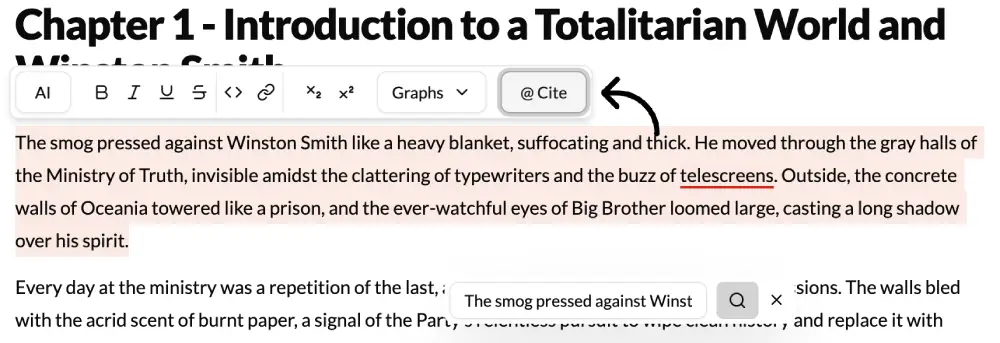
What It Does?
The Citation tool is an indispensable feature for academic, non-fiction, and research writers. It automates the tedious and error-prone process of creating accurate, consistently formatted citations. It connects directly with your Research Work in the Lore Book and your project’s AI Settings to generate perfect in-text citations and build your bibliography on the fly.
How to Use It?
- Set Your Style: First, go to your project’s AI Settings and select your required citation style (e.g., APA 7, MLA 9, Chicago).
- Populate Your Research: Add your sources to the Research Work section of the Lore Book, ensuring all bibliographic information is present.
- Write Your Claim: In your main draft, write a sentence that presents information, a quote, or an idea from one of your sources.
- Highlight and Cite: Highlight the sentence you just wrote.
- Click Citation: Choose the “Citation” option from the contextual menu.
- Select Your Source: The AI will prompt you to select the source from your Research Work database that supports the claim.
- Auto-Generation: The tool will instantly perform two actions:
- It will insert a perfectly formatted in-text citation (e.g., (Smith, 2021)) at the end of your sentence.
- It will automatically add the full, correctly formatted reference to your bibliography or works cited page at the end of your document.
Best Use Cases
- Academic Integrity: This is the primary use. It ensures that you are properly attributing all source material, which is essential for avoiding plagiarism and adhering to academic standards.
- Saving Time and Effort: Manually formatting dozens of sources for a bibliography can take hours. This tool reduces that work to a series of clicks, freeing you up to focus on your writing and research.
- Ensuring Consistency and Accuracy: It’s easy to make small mistakes when formatting citations manually (a misplaced comma, an incorrect year). The AI eliminates this human error, ensuring every citation is perfect according to the style guide you’ve chosen.
- Journalism and Non-Fiction: Quickly cite sources for factual claims, adding credibility and transparency to your articles.
Pro-Tip
Even if a source isn’t in your Lore Book yet, you can still use the citation tool. If you select “Citation,” you will have an option to “Add New Source.” You can paste a URL or DOI, and the AI will attempt to find the bibliographic information automatically and add it to both your Research Work and the citation, streamlining your workflow even further.