What It Does?
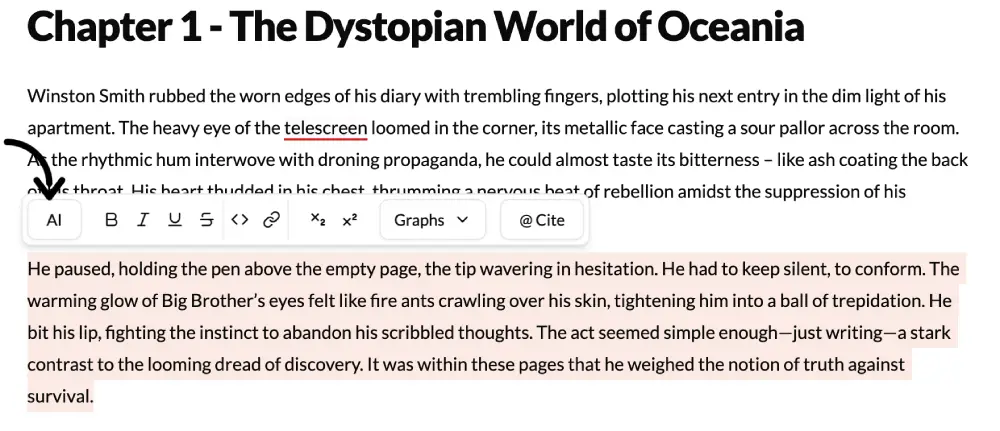
The AI Commands feature is the most powerful and versatile tool in the Selection Menu. It is a direct, open-ended command line to the AI Assistant, allowing you to give custom instructions that go far beyond the other pre-set functions. If you can think of a way to change or analyze your text, you can ask the AI to do it here.
How to Use It?
- Highlight Text: Select the portion of text you want the AI to work on. This provides the context for your command.
- Select AI Commands: Click the “AI Commands” option in the menu.
- Write Your Instruction: A prompt box will appear. Type a clear, specific command telling the AI exactly what you want it to do. Press Enter.
- Review and Apply: The AI will process your request and suggest a new version. You can then accept, reject, or ask for a revision.
Best Use Cases
- For Fiction Writers:
- Sensory Enhancement: Highlight a description and command, “Add more sensory details (smell, sound, touch) to this passage.”
- Subtextual Dialogue: Select a line of dialogue and instruct, “Rewrite this to have a threatening subtext without changing the literal meaning.”
- Pacing Adjustment: Highlight an action scene and type, “Make the pacing faster by using shorter, more impactful sentences.”
- For Academic & Non-Fiction Writers:
- Fact-Checking: Highlight a statement and ask, “Verify this claim and provide a source if possible.”
- Argument Strengthening: Select a paragraph and command, “Identify the weakest point in this argument and suggest how to strengthen it.”
- Finding Counterarguments: Highlight your main point and instruct, “What is the most common counterargument to this position?”
- For Marketers & Professionals:
- Benefit-Oriented Language: Select a product feature description and command, “Rewrite this to focus on the customer benefit, not just the feature.”
- Add a Call-to-Action: Highlight the end of a paragraph and instruct, “Add a compelling call-to-action to this section.”
- SEO Keywords: Select a block of text and ask, “Incorporate the keyword ‘sustainable living’ naturally into this paragraph.”
Pro-Tip
You can “chain” commands for complex results. For example, after the AI rewrites a paragraph to be more menacing, you can highlight the new version and issue a follow-up command like, “Now, shorten this by 20% without losing the menacing tone.” This iterative process gives you an incredible degree of creative control.