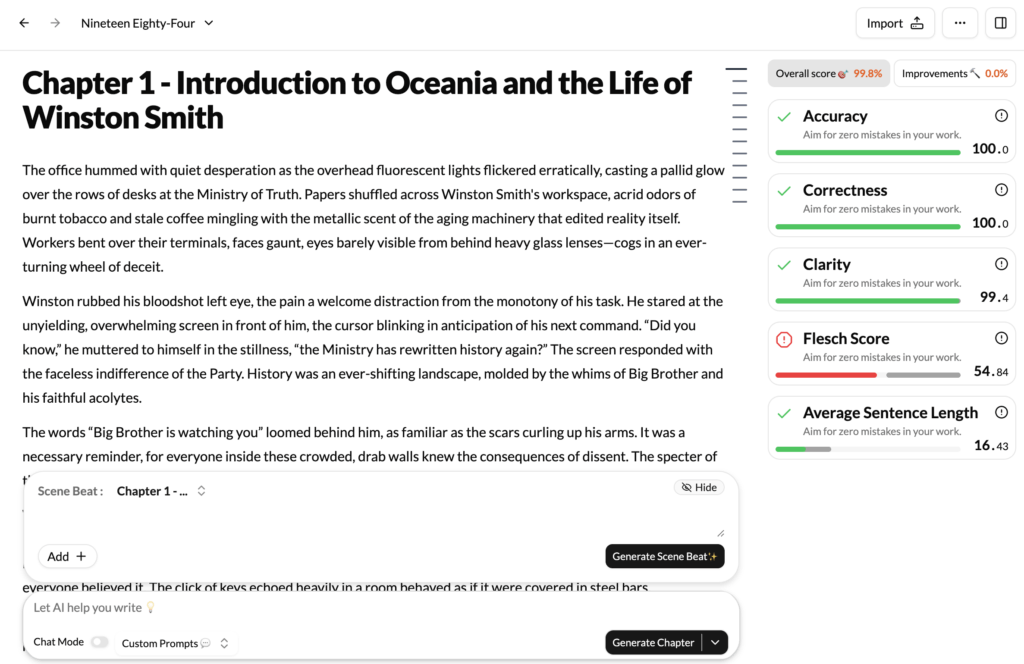
If the Summary Report provides the high-level data, the Overview and Improvements feature is your interactive, AI-powered editor that lives in your right sidebar. This is where the AI provides qualitative, actionable feedback to guide your revision process.
As you write, or after generating a full report, this sidebar populates with a dynamic checklist of suggestions, categorized to help you focus on specific areas of improvement.
How to Use the Improvements Sidebar
The sidebar provides a real-time analysis of your prose, flagging potential issues and offering concrete suggestions. The workflow is designed to be seamless:
- View Categories: The sidebar organizes feedback into clear categories like “Repetitive Language” or “Clarity & Readability.”
- Expand a Suggestion: Click on a category to see specific instances the AI has flagged. For example, under “Show, Don’t Tell,” it might identify the sentence, “Sarah was terrified.”
- Jump to Text: Each suggestion is linked directly to the corresponding passage in your manuscript. Clicking it instantly navigates your editor to that exact sentence.
- Revise and Resolve: Apply the suggestion or make your own edits. As you resolve issues, you can mark them as complete, turning revision into a manageable and satisfying process.
Key Improvement Categories
- Prose and Style Suggestions:
- Repetitive Word and Phrase Finder: The sidebar lists words and “crutch phrases” you may be overusing (e.g., “suddenly,” “just”) and shows the count for each, allowing you to jump to every instance.
- Passive Voice Usage: It highlights sentences written in the passive voice, often offering an active-voice alternative.
- ‘Show, Don’t Tell’: Identifies sentences where you’ve told the reader an emotion and suggests ways to show it through action or description.
- High-Level Thematic & Structural Feedback:
- Plot Consistency Check: The AI cross-references events with your Lore Book and flags inconsistencies as a high-priority item in the sidebar. For example: “Flagged Inconsistency: In Chapter 5, the protagonist says they cannot use fire magic, but in Chapter 18, they cast a fire spell without explanation.”
- Character Arc Analysis: The AI provides a summary of each main character’s development, flagging moments that may feel underdeveloped or inconsistent with their established motivations.
- Theme Coherence: The AI tracks your main themes and will point out sections where a theme is less present, suggesting opportunities to strengthen it.
The Overview and Improvements sidebar transforms revision from a daunting task into an interactive checklist. It closes the loop, turning your creative output into a clear set of steps for transforming a good draft into a truly great piece of writing.