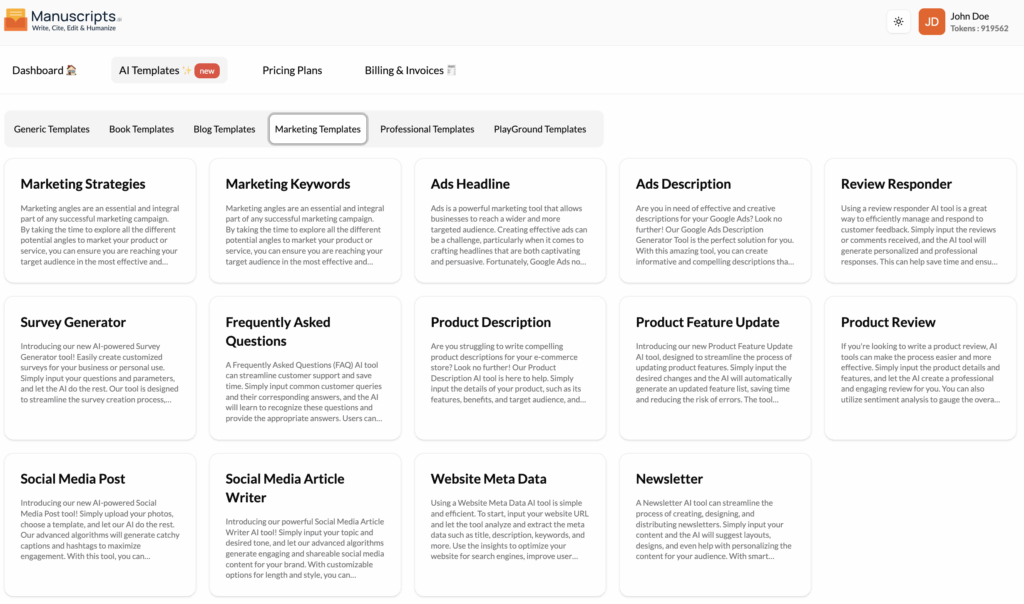
Marketing Strategies
What It Is?
The Marketing Strategies template is your AI-powered brainstorming partner for campaign planning. It helps you explore all the different “marketing angles” you can take to promote your product or service, ensuring you reach your target audience in the most effective way possible.
This tool can generate a wide range of ideas, such as leveraging existing customer relationships, creating targeted campaigns, focusing on digital marketing, utilizing personalization techniques, and more.
How to Use It?
- Navigate to Templates: Open the “AI Templates” library.
- Select Template: Find and click on “Marketing Strategies” in the “Marketing Templates” section.
- Provide Inputs:
- Product/Service: Briefly describe what you are selling.
- Target Audience: Who are you trying to reach?
- Goal (Optional): What is the main goal? (e.g., “Increase brand awareness,” “Drive sales”).
- Generate: Click the “Generate” button to get a list of creative marketing angles and strategies.
Best Use Cases
- Campaign Kick-offs: Brainstorming initial ideas for a new product launch.
- Marketing Planning: Building a comprehensive marketing plan.
- Finding New Angles: Discovering new ways to market an existing product.
Marketing Keywords
What It Is?
The Marketing Keywords template is your SEO (Search Engine Optimization) and PPC (Pay-Per-Click) research assistant. This tool generates a list of relevant keywords and phrases that your target audience is using to search for products or services like yours.
A strong keyword strategy is essential for any digital marketing campaign. This template helps you identify high-intent keywords for your ad campaigns, blog content, and website copy to ensure you are reaching your target audience effectively.
How to Use It?
- Navigate to Templates: Open the “AI Templates” library.
- Select Template: Find and click on “Marketing Keywords” in the “Marketing Templates” section.
- Provide Inputs:
- Product/Service/Topic: Describe what you are marketing.
- Target Audience (Optional): Who is your ideal customer?
- Generate: Click the “Generate” button. The AI will provide a list of keywords, often grouped by category (e.g., “short-tail,” “long-tail,” “question-based”).
Best Use Cases
- SEO Content: Finding keywords to target in your blog posts and web pages.
- Google Ads: Building keyword lists for your ad groups.
- Market Research: Understanding the language your customers use.
Ads Headline
What It Is?
The Ads Headline template is a specialized tool for creating captivating and persuasive headlines for your digital ad campaigns, particularly for platforms like Google Ads. Creating effective ad headlines is a challenge, as you have very limited space to grab attention.
This feature uses advanced algorithms to analyze your product or service and provides you with a list of suggested headlines that are tailored to your needs and designed to maximize click-through rates.
How to Use It?
- Navigate to Templates: Open the “AI Templates” library.
- Select Template: Find and click on “Ads Headline” in the “Marketing Templates” section.
- Provide Inputs:
- Product/Brand Name: The name of your product.
- Brief Description: What does it do? What is the main benefit?
- Keywords (Optional): The main keyword for the ad group.
- Generate: Click the “Generate” button to get a list of short, powerful headlines.
Best Use Cases
- Google Ads (PPC): Generating multiple headlines for your Responsive Search Ads.
- Social Media Ads: Creating the main headline for a Facebook or LinkedIn ad.
- A/B Testing: Quickly generating 5-10 variations of a headline to test against each other.
Ads Description
What It Is?
The Ads Description template is the companion to the “Ads Headline” tool. It crafts the informative and compelling description text that appears below your headline in a digital ad.
This tool helps your ads stand out from the competition by generating creative and persuasive descriptions that highlight benefits and include a strong call-to-action. A good description is crucial for improving your ad’s click-through rate.
How to Use It?
- Navigate to Templates: Open the “AI Templates” library.
- Select Template: Find and click on “Ads Description” in the “Marketing Templates” section.
- Provide Inputs:
- Product/Brand Name: The name of your product.
- Brief Description: What it does and its key benefits.
- Call-to-Action (Optional): (e.g., “Shop Now,” “Learn More”).
- Generate: Click the “Generate” button to get several ad description options.
Best Use Cases
- Google Ads (PPC): Writing the 90-character descriptions for your search ads.
- Social Media Ads: Crafting the primary text for Facebook, Instagram, or LinkedIn ads.
- Display Ads: Writing concise, punchy copy for banner ads.
Review Responder
What It Is?
The Review Responder is an essential tool for managing your brand’s reputation. It helps you efficiently manage and respond to customer feedback and reviews (both positive and negative) in a personalized and professional way.
You simply input the customer’s review, and the AI tool will generate a thoughtful response. This saves you time and ensures that all feedback is acknowledged and addressed in a timely manner. The AI can customize responses based on the tone and content of the review, helping you maintain positive relationships with customers.
How to Use It?
- Navigate to Templates: Open the “AI Templates” library.
- Select Template: Find and click on “Review Responder” in the “Marketing Templates” section.
- Provide Inputs:
- Customer Review: Paste the full text of the customer’s review.
- Sentiment: Indicate if the review is “Positive,” “Negative,” or “Mixed.”
- Key Points to Address (Optional): (e.g., “Apologize for the shipping delay,” “Thank them for praising the customer service”).
- Generate: Click the “Generate” button to get a draft response.
Best Use Cases
- Reputation Management: Responding to reviews on Google, Yelp, Amazon, or other platforms.
- Customer Service: Quickly addressing customer comments on social media.
- Brand Building: Showing customers that you are listening and engaged.
Survey Generator
What It Is?
The Survey Generator is an AI-powered tool that streamlines the process of creating customized surveys. Instead of struggling to write unbiased, effective questions, you can simply input your goals and let the AI do the rest.
This tool is designed to save you time and effort, generating insightful survey questions to help you gain valuable feedback from customers, employees, or any other audience. It’s perfect for market research, measuring customer satisfaction, or gauging employee engagement.
How to Use It?
- Navigate to Templates: Open the “AI Templates” library.
- Select Template: Find and click on “Survey Generator” in the “Marketing Templates” section.
- Provide Inputs:
- Survey Topic/Goal: What do you want to learn? (e.g., “Customer satisfaction with our new software,” “Employee morale,” “Market research for a new product”).
- Target Audience: Who is taking the survey?
- Question Types (Optional): (e.g., “Multiple Choice,” “Scale of 1-5,” “Open-ended”).
- Generate: Click the “Generate” button to get a list of survey questions.
Best Use Cases
- Market Research: Creating surveys to validate a new product idea.
- Customer Feedback: Building a customer satisfaction (CSAT) or Net Promoter Score (NPS) survey.
- Human Resources: Drafting employee engagement or post-event feedback surveys.
Frequently Asked Questions
What It Is?
The Frequently Asked Questions (FAQ) template helps you streamline customer support by generating a list of common questions and, more importantly, clear, concise answers.
You can input your common customer queries and let the AI draft professional answers. This tool can also analyze a product description or service page and predict what questions customers might have. The resulting FAQ list can be integrated directly into your website or app, providing immediate assistance to customers 24/7 and saving your support team valuable time.
How to Use It?
- Navigate to Templates: Open the “AI Templates” library.
- Select Template: Find and click on “Frequently Asked Questions” in the “Marketing Templates” section.
- Method 1 (Generate Answers):
- Input: Paste a list of common questions your customers ask.
- Generate: The AI will write clear answers for each one.
- Method 2 (Generate Questions & Answers):
- Input: Paste a description of your product or service.
- Generate: The AI will generate a list of likely questions and their answers.
Best Use Cases
- Website Content: Creating an FAQ page for your website.
- Product Launches: Preparing an FAQ for a new product or feature.
- Customer Support: Building a knowledge base for your support team and customers.
Product Description
What It Is?
The Product Description template is designed to solve one of the biggest challenges in e-commerce: writing compelling copy that sells. This tool takes your product’s details and transforms them into professional, engaging, and persuasive descriptions.
Simply input your product’s features, benefits, and target audience, and let the AI generate a description that is optimized for conversion. This saves you time and effort while ensuring your product copy is informative and effective.
How to Use It?
- Navigate to Templates: Open the “AI Templates” library.
- Select Template: Find and click on “Product Description” in the “Marketing Templates” section.
- Provide Inputs:
- Product Name: The name of your product.
- Features & Benefits: List the key features and, more importantly, what they do for the customer.
- Target Audience: Who is this product for?
- Tone of Voice: (e.g., “Playful,” “Luxurious,” “Technical”).
- Generate: Click the “Generate” button to get several product description options.
Best Use Cases
- E-commerce Stores: Writing product copy for Shopify, Amazon, or any online storefront.
- Marketing Brochures: Creating descriptive text for print materials.
- Landing Pages: Writing the main “features” section of a product landing page.
Product Feature Update
What It Is?
The Product Feature Update template streamlines the process of communicating changes to your product. It’s designed to generate clear, concise text for “What’s New” announcements, patch notes, or updated feature lists.
You can input the desired changes, and the AI will automatically generate user-friendly text, saving time and reducing the risk of confusing your customers. The tool uses natural language processing to understand the changes and explain them clearly and efficiently.
How to Use It?
- Navigate to Templates: Open the “AI Templates” library.
- Select Template: Find and click on “Product Feature Update” in the “Marketing Templates” section.
- Provide Inputs:
- Product Name: The name of your software or product.
- List of Changes: Briefly list the updates, new features, or bug fixes (e.g., “Added dark mode,” “Fixed login bug,” “Improved export speed”).
- Tone: (e.g., “Excited,” “Formal,” “Technical”).
- Generate: Click the “Generate” button to get a polished announcement.
Best Use Cases
- App Updates: Writing “What’s New” text for the App Store or Google Play Store.
- SaaS Announcements: Crafting in-app notifications or emails about new features.
- Patch Notes: Creating clear, readable patch notes for a game or software.
Product Review
What It Is?
The Product Review template helps you write a comprehensive and engaging review for a product. Whether you’re a blogger, an affiliate marketer, or just want to provide high-quality feedback, this tool makes the process easier.
You input the product details and features, and the AI will help you create a professional review. It can also help you structure the review (e.g., Introduction, Pros, Cons, Conclusion) and can even be guided to optimize the review for SEO, helping it reach a wider audience.
How to Use It?
- Navigate to Templates: Open the “AI Templates” library.
- Select Template: Find and click on “Product Review” in the “Marketing Templates” section.
- Provide Inputs:
- Product Name: The product you are reviewing.
- Key Features: What does it do?
- Pros: What did you like about it?
- Cons: What did you dislike?
- Overall Opinion/Rating: Your final verdict.
- Generate: Click the “Generate” button to get a structured product review.
Best Use Cases
- Affiliate Marketing: Writing detailed reviews for your blog to drive affiliate sales.
- E-commerce: Writing “Editor’s Pick” or featured reviews for your own store.
- Content Creation: Quickly drafting review scripts for a YouTube video or podcast.
Social Media Post
What It Is?
The Social Media Post template is your fast track to creating engaging content for platforms like Instagram, Facebook, and Twitter. This AI-powered tool generates catchy captions and relevant hashtags to maximize your engagement.
You can simply provide a topic, a link, or even just a general idea, and the AI will generate several post options. This saves you time and helps you effortlessly create eye-catching posts, even when you’re not feeling creative.
How to Use It?
- Navigate to Templates: Open the “AI Templates” library.
- Select Template: Find and click on “Social Media Post” in the “Marketing Templates” section.
- Provide Inputs:
- Platform: (e.g., “Instagram,” “Twitter,” “LinkedIn”).
- Topic/Prompt: What is the post about? (e.g., “A photo of our new product,” “A link to our new blog post,” “A motivational quote for Monday”).
- Tone: (e.g., “Funny,” “Inspirational,” “Professional”).
- Generate: Click the “Generate” button to get post copy and hashtag suggestions.
Best Use Cases
- Daily Social Media Management: Quickly creating your daily content.
- Campaigns: Generating consistent copy across all social platforms for a new launch.
- Engagement: Writing clever captions or questions to boost comments and likes.
Social Media Article Writer
What It Is?
The Social Media Article Writer is a powerful template designed for creating long-form content for platforms like LinkedIn Articles or Medium. This goes beyond a simple “post” to generate engaging, shareable articles.
You input your topic and desired tone, and the advanced algorithms will generate a high-quality article for your brand. This allows you to streamline your social media marketing efforts, establish thought leadership, and captivate your audience with innovative content.
How to Use It?
- Navigate to Templates: Open the “AI Templates” library.
- Select Template: Find and click on “Social Media Article Writer” in the “Marketing Templates” section.
- Provide Inputs:
- Topic: The subject of your article (e.g., “The Future of Remote Work”).
- Key Points (Optional): An outline of the main arguments.
- Tone: (e.g., “Authoritative,” “Thought-provoking,” “Casual”).
- Platform: (e.g., “LinkedIn,” “Medium”).
- Generate: Click the “Generate” button to get a full-length article draft.
Best Use Cases
- Thought Leadership: Writing articles for LinkedIn to build your professional brand.
- Content Repurposing: Turning a blog post or talk into an article for Medium.
- Brand Storytelling: Writing longer, narrative-driven content for your Facebook Page.
Website Meta Data
What It Is?
The Website Meta Data template is a technical SEO tool that helps you optimize your website for search engines. It generates the crucial “meta title” and “meta description” for any page on your site.
These are the title and description that appear in Google search results. A good meta title and description are critical for improving click-through rates and driving more traffic. This tool analyzes your page (or a description of it) and creates optimized metadata that is within the character limits and designed to attract clicks.
How to Use It?
- Navigate to Templates: Open the “AI Templates” library.
- Select Template: Find and click on “Website Meta Data” in the “Marketing Templates” section.
- Provide Inputs:
- Page URL (Recommended): Paste the URL of the web page you want to optimize.
- OR Page Description: If the page isn’t live, paste the page content or a summary.
- Target Keyword: The main keyword you want the page to rank for.
- Generate: Click the “Generate” button to get an optimized meta title and meta description.
Best Use Cases
- On-Page SEO: Optimizing all your key website pages (homepage, service pages, etc.).
- Blogging: Writing the meta description for every new blog post.
- Website Redesigns: Quickly generating new metadata for all your new pages.
Newsletter
What It Is?
The Newsletter template helps you streamline the entire process of creating your email newsletter. This tool can help you brainstorm content ideas, suggest layouts, and even write the newsletter copy itself.
You can input your content (like links to your latest blog posts, news, or a special offer), and the AI will help you weave it into an engaging newsletter. It can also help with personalizing the content for your audience, saving you time and effort while improving the effectiveness of your email marketing.
How to Use It?
- Navigate to Templates: Open the “AI Templates” library.
- Select Template: Find and click on “Newsletter” in the “Marketing Templates” section.
- Provide Inputs:
- Newsletter Goal/Theme: (e.g., “Weekly roundup,” “New product launch,” “Special discount”).
- Key Content: List the main points, links, or articles to include.
- Target Audience: (e.g., “Existing Customers,” “New Subscribers”).
- Tone: (e.g., “Friendly and casual,” “Exclusive and professional”).
- Generate: Click the “Generate” button to get a draft of your newsletter, often including a subject line, intro, body sections, and a conclusion.
Best Use Cases
- Email Marketing: Quickly drafting your weekly or monthly newsletter.
- Content Curation: Assembling a “roundup” newsletter of interesting links.
Sales & Promotions: Writing compelling copy for a sales-focused email blast.