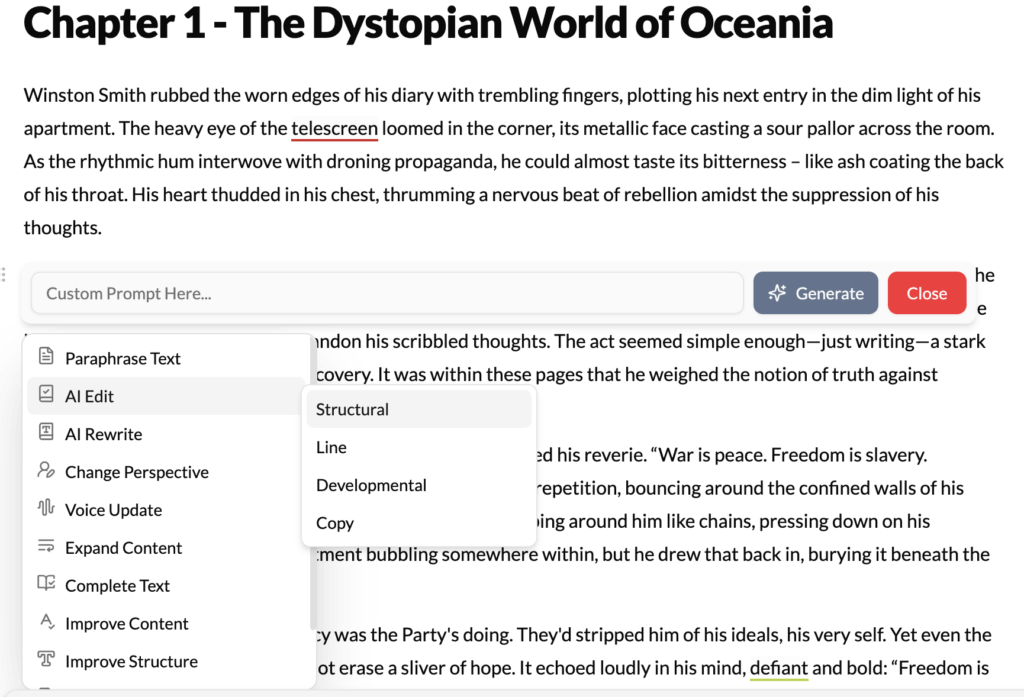
What It Does?
The AI Edit tool functions as your personal, on-demand copy editor and proofreader. It performs a comprehensive scan of the selected text to identify and correct a wide range of technical errors. Its focus is not on changing your ideas, but on ensuring your prose is clean, correct, and professional.
How to Use It?
- Highlight Text: Select a paragraph, section, or even the entire chapter you’ve just finished drafting.
- Click AI Edit: Choose the “AI Edit” option from the menu.
- Review Corrections: The AI will automatically apply corrections to the text. In some modes, it may highlight the changes, allowing you to accept or reject them individually.
What It Corrects?
- Spelling and Grammar: Catches everything from simple typos to complex grammatical mistakes like subject-verb agreement, incorrect tense, or dangling modifiers.
- Punctuation: Fixes misplaced commas, incorrect use of semicolons, and ensures consistent punctuation style throughout the document.
- Awkward Phrasing: Identifies and rephrases sentences that are grammatically correct but sound unnatural or are difficult to read.
- Clarity and Conciseness: It may suggest removing redundant words or simplifying convoluted sentences to make your point more directly.
How It’s Different from Content Improver?
- AI Edit is the mechanic. It fixes what is technically broken (grammar, spelling).
- Content Improver is the performance tuner. It takes text that is already correct and makes it more engaging, impactful, and persuasive.
Best Use Cases
- After a Drafting Session: This is the perfect tool to run after you’ve finished writing for the day. It cleans up the inevitable typos and errors made when you were focused on getting ideas down on the page.
- Before Sharing Your Work: Whether you’re sending a chapter to your critique group, a report to your boss, or a blog post to be published, running AI Edit first is a crucial step to ensure your work looks polished and professional.
- For Non-Native Speakers: It can be an invaluable learning tool, helping to identify and correct common grammatical errors, thereby improving language fluency over time.
Pro-Tip
For best results, use AI Edit after you have finished your major structural and creative revisions. There’s no point in meticulously proofreading a paragraph that you might end up deleting or completely rewriting later. Use it as one of the final steps in your writing process for any given section.