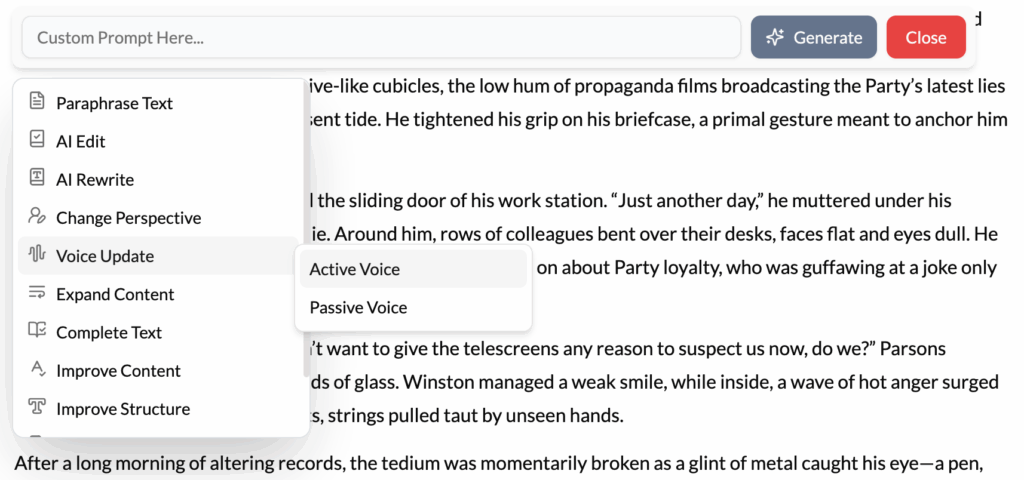
What It Does?
The Voice Update tool is a powerful consistency engine. It analyzes and rewrites selected text to ensure it aligns with a specific, predefined voice. This “voice” can be a detailed character profile you’ve created in your Lore Book or a professional brand style guide you’ve established for your business.
How to Use It?
- Define Your Voices: For this tool to work effectively, you must first have well-defined entries in your Lore Book. For a character, detail their vocabulary, sentence structure, and personality (e.g., “Kaelen: speaks in short, clipped sentences; uses military jargon; is always direct and never sarcastic”). For a brand, define its tone (e.g., “Brand Voice: friendly, professional, and encouraging; avoids slang”).
- Highlight Text: Select the dialogue or paragraph that feels inconsistent with the intended voice.
- Click Voice Update: Choose the option from the menu.
- Select the Target Voice: The AI will prompt you to choose the voice profile you want to apply (e.g., “Kaelen,” “Brand Voice”).
- Apply the Update: The AI will then rewrite the text, adjusting word choice, sentence structure, and tone to perfectly match the target voice profile.
Best Use Cases
- Maintaining Distinct Character Voices: In a novel with many characters, it’s easy for their dialogue to start sounding the same. If a line from your stoic warrior sounds too much like your witty rogue, use this tool to instantly correct it based on their profiles.
- Brand Consistency in Marketing: A marketing team can use this to ensure all content—from blog posts to social media updates to website copy—maintains a consistent brand voice, regardless of which team member wrote the initial draft.
- Adapting Content for Different Audiences: You can create different voice profiles for different audiences (e.g., “Expert Audience,” “Beginner Audience”). Then, you can highlight a technical paragraph and use Voice Update to quickly create a simplified version for beginners or a more detailed version for experts.
- Ensuring Formal Tone in Academic Writing: Create a “Formal Academic” voice profile. If you find a paragraph where your tone has become too conversational, this tool can quickly adjust it to be more objective and scholarly.
Pro-Tip
The more detailed your voice profiles are, the better this tool will work. Don’t just write “sarcastic.” Write “Uses dry, understated sarcasm; often employs rhetorical questions; has a more advanced vocabulary.” Give the AI specific, actionable details, and its output will be remarkably accurate.