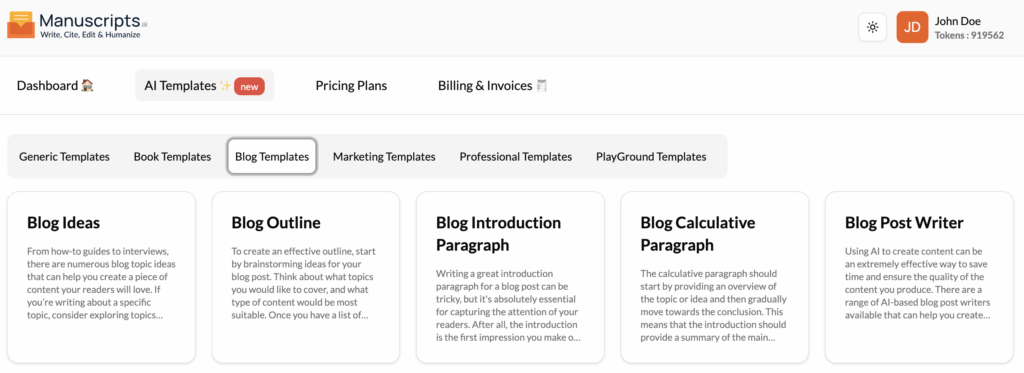
Blog Ideas
What It Is?
The Blog Ideas template is your personal brainstorming partner for content creation. It’s designed to help you generate a list of engaging and relevant blog topic ideas, ensuring you never run out of things to write about.
The AI can suggest a wide range of topics, from “how-to” guides and interviews to explorations of the latest industry trends or in-depth looks at new technology. This helps you create interesting and informative posts that will capture your readers’ attention and keep them coming back for more.
How to Use It?
- Navigate to Templates: Open the “AI Templates” library.
- Select Template: Find and click on “Blog Ideas” in the “Blog Templates” section.
- Provide Inputs:
- Main Topic/Niche: Enter your blog’s general subject (e.g., “Home Gardening,” “Cryptocurrency,” “Personal Finance for Millennials”).
- Target Audience (Optional): (e.g., “Beginners,” “Experts,” “Small Business Owners”).
- Generate: Click the “Generate” button to receive a list of blog post titles and ideas.
Best Use Cases
- Content Calendar Planning: Generating a month’s worth of blog topics at once.
- Overcoming Writer’s Block: Finding a new angle on a familiar topic.
- Audience Expansion: Discovering new topic “clusters” to attract a wider audience.
Blog Outline
What It Is?
The Blog Outline template creates a structured, logical framework for your blog post. An effective outline is the key to an organized and easy-to-read article. This tool takes your main topic and breaks it down into smaller sections, main points, and sub-topics.
This process helps you organize your thoughts before you start writing, ensuring your final post flows logically from the introduction to the conclusion. It’s the perfect way to build a strong foundation for your article.
How to Use It?
- Navigate to Templates: Open the “AI Templates” library.
- Select Template: Find and click on “Blog Outline” in the “Blog Templates” section.
- Provide Inputs:
- Blog Post Title/Topic: Enter the main idea of your article (e.g., “The Top 5 Benefits of Meditation for Busy Professionals”).
- Key Points (Optional): List any specific points you want to make sure are included in the outline.
- Generate: Click the “Generate” button. The AI will produce a structured outline, often with headings (H2s) and bullet points for sub-topics.
Best Use Cases
- Pre-Writing: The essential second step after choosing your blog idea.
- Structuring Complex Topics: Breaking down a large, complicated subject into manageable parts.
- Guiding AI Generation: Using the generated outline as a guide for the “Blog Post Writer” or “Paragraph Writer” templates.
Blog Introduction Paragraph
What It Is?
The Blog Introduction Paragraph template is designed to solve one of the most difficult parts of writing: starting. A great introduction is essential for capturing your readers’ attention and setting the stage for the rest of your post.
Many bloggers struggle with getting stuck on the opening sentence. This tool removes that barrier by generating a compelling, engaging introduction that hooks the reader and clearly states the post’s purpose.
How to Use It?
- Navigate to Templates: Open the “AI Templates” library.
- Select Template: Find and click on “Blog Introduction Paragraph” in the “Blog Templates” section.
- Provide Inputs:
- Blog Post Title/Topic: The title or main subject of your article.
- Target Audience (Optional): Who are you writing for?
- Tone: (e.g., “Intriguing,” “Direct,” “Friendly”).
- Generate: Click the “Generate” button to get one or more introduction paragraphs to choose from.
Best Use Cases
- Beating Writer’s Block: Instantly starting your blog post with a strong opening.
- Improving Bounce Rate: Writing a hook that encourages readers to stay on the page and read more.
- Clarifying Your Angle: Helping you solidify the main promise of your article by drafting the intro first.
Blog Explanatory Paragraph
(Note: This template, referred to as “Blog Calculative Paragraph,” is designed for writing clear, structured body paragraphs that move logically from an overview to a conclusion.)
What It Is?
The Blog Explanatory Paragraph template helps you write the main body of your blog post. It’s designed to create well-structured paragraphs that first provide an overview of a topic or idea and then gradually move toward a conclusion, elaborating on the main points.
This ensures that readers have a clear understanding of the topic being discussed. This template is perfect for elaborating on the points from your outline and providing your readers with further information, evidence, or argumentation.
How to Use It?
- Navigate to Templates: Open the “AI Templates” library.
- Select Template: Find and click on “Blog Explanatory Paragraph” (or “Blog Calculative Paragraph”) in the “Blog Templates” section.
- Provide Inputs:
- Main Point: The central idea this paragraph should explain (e.g., “Explain why meditation reduces stress”).
- Supporting Details (Optional): List any facts or examples to include.
- Tone: (e.g., “Informative,” “Persuasive”).
- Generate: Click the “Generate” button.
Best Use Cases
- Drafting Body Content: Writing the “meat” of your blog post, one point at a time.
- Explaining Complex Ideas: Breaking down a topic in a logical, easy-to-follow paragraph.
- Building an Argument: Writing paragraphs that support your post’s main thesis.
Blog Post Writer
What It Is?
The Blog Post Writer is your all-in-one tool for creating a complete, high-quality blog post. This template is designed to save you significant time and effort by generating a full article based on your inputs.
This AI-based tool can produce content faster and more efficiently than writing from scratch. You can provide a topic, an outline, or keywords, and the AI will generate an introduction, body paragraphs, and a conclusion, all while maintaining a consistent tone and quality.
How to Use It?
- Navigate to Templates: Open the “AI Templates” library.
- Select Template: Find and click on “Blog Post Writer” in the “Blog Templates” section.
- Provide Inputs (The more, the better):
- Blog Post Title/Topic: The main subject.
- Outline (Optional but recommended): Paste the outline from the “Blog Outline” template for best results.
- Keywords (Optional): Key terms to include for SEO.
- Tone of Voice: (e.g., “Professional,” “Witty,” “Inspirational”).
- Generate: Click the “Generate” button to produce a full draft of your blog post.
Best Use Cases
- Rapid Content Creation: Generating a full first draft in minutes.
- Content Scaling: Quickly producing a high volume of articles for your blog.
- Guest Posting: Efficiently writing posts for other publications.
Repurposing Content: Turning a video or podcast outline into a full article.