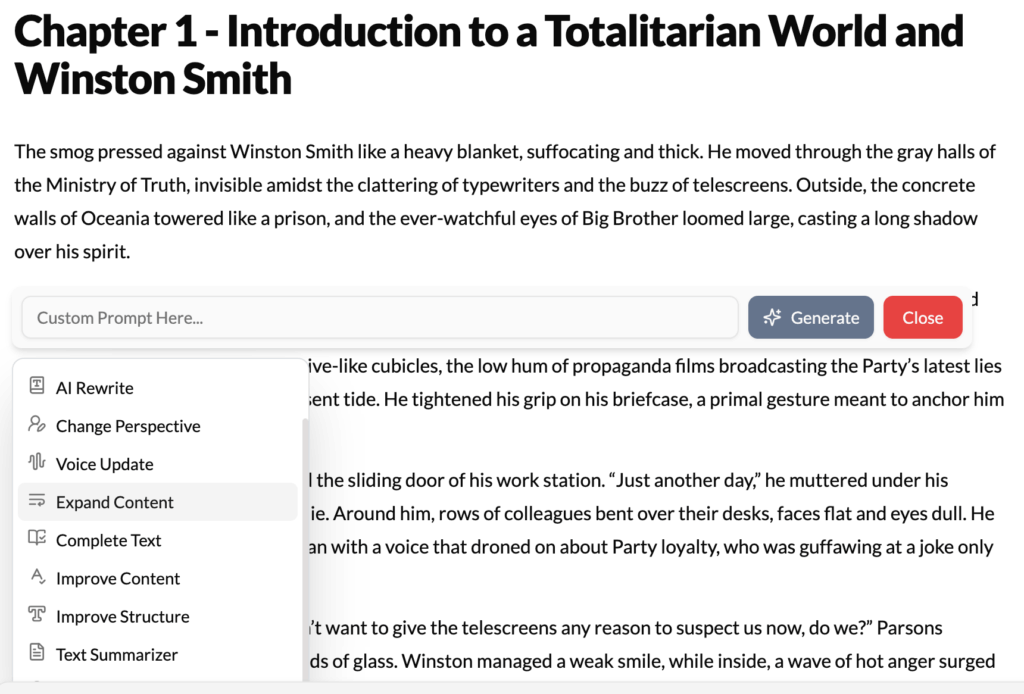
What It Does?
The Expand Content tool is designed to combat sparse writing and add depth to your ideas. It takes a concise sentence or a short paragraph and intelligently elaborates on it, adding more detail, description, and context. It’s the perfect tool for transforming a simple statement into a rich, fully-realized passage.
How to Use It?
- Write a Core Idea: Start with a simple, declarative sentence. This is the seed for the expansion.
- Highlight the Text: Select the sentence or brief paragraph you want to flesh out.
- Click Expand Content: Choose the option from the contextual menu.
- Review the Expanded Passage: The AI will generate a longer, more detailed version of your initial idea, weaving in descriptive language and relevant details based on the context of your document.
Example
Original Text:
The spaceship was damaged.
After Using “Expand Content”:
The spaceship was critically damaged. Sparks cascaded from a deep gash in the port nacelle, and the acrid smell of ozone filled the bridge. Red alert klaxons blared in a frantic, repeating rhythm, and the deck plates shuddered violently as the secondary life support systems struggled to compensate for the hull breach.
Best Use Cases
- Enriching Descriptions: This is its primary function. Turn “She was sad” into a poignant description of her posture, expression, and the tear she’s trying to hide. Transform “The castle was old” into an evocative passage about crumbling masonry and ivy-covered walls.
- Explaining Complex Topics: In non-fiction or academic writing, you might state a main point. Use Expand Content to generate a more detailed explanation, including examples or clarifications, making the topic easier for the reader to understand.
- Adding “Show, Don’t Tell”: This tool is a masterclass in showing. If you’ve “told” the reader an emotion or a fact (e.g., “He was angry”), highlight that sentence and let the AI “show” it through action, dialogue, and internal thought.
- Fleshing Out Outline Points: When you’re drafting from an outline, you might have a simple note like “They argue.” You can write that sentence, highlight it, and use Expand Content to generate a full paragraph of dialogue and action that accomplishes the goal of the scene.
Pro-Tip
For the best results, give the AI good context. The more information it has from the preceding paragraphs, the more relevant and specific its expansion will be. If the previous paragraph established that the characters are in a frozen wasteland, expanding on “The spaceship was damaged” will likely include details about ice cracking on the viewport or the cold seeping through the breach.